17. Transport and the client¶
What you will learn¶
- How audio actually travels between a user's device and your servers: frames, packets, codecs and sample rates, and how many milliseconds each step costs.
- Why browsers and phones should reach a voice service over WebRTC, and where a WebSocket is the right tool.
- What a jitter buffer trades, and why its size is part of every latency budget.
- Why echo cancellation has to run on the user's device, and how large the device's own microphone and speaker delay can be.
Before you start¶
- Chapters: 1 (samples, sample rates and bytes) and 3 (the parts of a latency budget). Chapters 15 and 16 explain the servers that sit at the far end of the connections in this chapter.
- Tools: Python 3.11 with the packages in
code/(see Try it). No GPU is needed.
Audio leaves the device in frames¶
Everything earlier in this book handled audio that was already on the server. A real user is somewhere else, holding a phone or sitting at a laptop. Before your recognizer sees a single sample, the audio is captured by a microphone, cut into frames, compressed, wrapped in packets, sent across a network, buffered, decompressed and resampled. Synthesized speech makes the same trip in reverse. Each step has a cost in milliseconds, and some of those costs are fixed by physics or by standards rather than by anything you can tune.
The unit that moves is a frame: a short, fixed stretch of audio that the codec compresses as one piece. On the web and in most real-time voice systems the codec is Opus, standardized in RFC 6716 (2012). Opus encodes frames of "2.5, 5, 10, 20, 40, or 60 ms", and can combine several frames into one packet of up to 120 ms (RFC 6716 §2.1.4, p. 11). The RFC recommends 20 ms: "For this reason, 20 ms frames are a good choice for most applications" (same page).
A frame has to be complete before it can be encoded. So the frame length is a delay you pay on every packet, before any network is involved: a 20 ms frame means the first sample of the frame waits at least 20 ms on the device.
Over RTP, the protocol WebRTC uses to carry media, the Opus timestamp always counts at 48,000 Hz, "for all modes of Opus and all sampling rates" (RFC 7587 §4.1). That makes 48 kHz the natural clock for this chapter. At 48 kHz the Opus frame sizes are:
| Frame | Samples at 48 kHz |
|---|---|
| 2.5 ms | 120 |
| 5 ms | 240 |
| 10 ms | 480 |
| 20 ms | 960 |
| 40 ms | 1,920 |
| 60 ms | 2,880 |
What Opus adds on top of the frame¶
Opus is two codecs in one, and each adds a little look-ahead of its own: future samples the encoder needs before it can finish the current frame. This is the same idea as the look-ahead of a streaming encoder in chapter 5, at a smaller scale.
- The speech layer, SILK, uses frames of 10 to 60 ms plus "an additional 5 ms look-ahead for noise shaping estimation" (shaping the coding noise so that it is harder to hear), plus up to 1.5 ms for sample-rate conversion.
- The transform layer, CELT, uses frames of 2.5 to 20 ms plus "an additional 2.5 ms look-ahead due to the overlapping MDCT windows" (the overlapping windows of the transform it codes with). That 2.5 ms "cannot be reduced in the encoder".
- In hybrid mode, which mixes the two for super-wideband and fullband speech (SILK below 8 kHz, CELT above; wideband speech uses SILK alone), "the CELT encoder input is delayed by an additional 2.7 ms" so that the two layers line up.
(RFC 6716 §2, pp. 9-10.) Put together, the codec's algorithmic delay, frame plus look-ahead, ranges "from 5 ms to 65.2 ms" depending on mode and frame size (RFC 6716 §2, p. 8). Not every mode allows every frame size: SILK-only allows 10, 20, 40 and 60 ms; hybrid allows 10 and 20 ms; CELT-only allows 2.5, 5, 10 and 20 ms (RFC 6716 §3.1, Table 2, p. 15).
How many bits¶
For speech at 20 ms frames, the RFC's sweet spots are "8-12 kbit/s for NB speech", "16-20 kbit/s for WB speech" and "28-40 kbit/s for FB speech" (RFC 6716 §2.1.1, p. 10). NB, WB and FB are the audio bandwidths: Opus has five, with effective sample rates of 8, 12, 16, 24 and 48 kHz, and it "never codes audio above 20 kHz" (RFC 6716 §2, Table 1, p. 8). WebRTC's usual voice settings are "48khz sample rate, single channel, 32 kbs Opus encoding" (Voice AI & Voice Agents guide, §5.6, fetched 2026-10-29).
The packets themselves cost bits too. At 20 ms frames you send 50 packets a second. Each carries at least an IPv4 header (20 bytes), a UDP header (8 bytes) and an RTP header (12 bytes): 40 bytes, or 50 × 40 × 8 = 16 kbit/s of headers alone. At 32 kbit/s of Opus, the headers add half again. Longer frames cut the overhead (5.3 kbit/s at 60 ms frames), but then a single lost packet removes 60 ms of speech. This is the first trade-off of the chapter: short frames cost bandwidth, long frames cost delay and robustness.
When packets are lost¶
Opus has two tools for loss. In-band forward error correction (FEC) re-encodes perceptually important packets, "such as onsets or transients", at a lower bitrate and adds them to a later packet (RFC 6716 §2.1.7, p. 12). It is off unless the receiver asks for it: "If no value is specified, useinbandfec is assumed to be 0" (RFC 7587 §6.1). Packet loss concealment (PLC) is a decoder feature that fills a missing frame with a plausible continuation; the RFC says it "SHOULD be included when receiving from an unreliable channel" (RFC 6716 §4.4, p. 122). In CELT mode the reference decoder repeats a pitch period; in SILK mode it extrapolates from the previous frame.
Both tools only make sense if the transport is allowed to lose packets. That is the key to the next section.
WebRTC or WebSocket¶
There are two common ways to carry real-time audio between a client and a server.
- A WebSocket is a long-lived TCP connection. You send whatever you like over it: raw PCM chunks, Opus frames, JSON. It is simple, it works through every proxy, and every language has a library.
- WebRTC is a full real-time media stack built into browsers and available as mobile SDKs. It sends audio over UDP with RTP, encodes with Opus, estimates bandwidth, paces packets, buffers jitter, conceals loss and cancels echo.
The difference that matters is TCP against UDP. TCP delivers every byte in order. If one packet is lost, every later packet waits until the lost one is retransmitted: this is head-of-line blocking. For a file download that is exactly right. For live audio it means one lost packet delays every packet behind it, and the audio you eventually receive is late audio. UDP lets late packets be late or missing, which is what FEC, PLC and jitter buffers are designed around.
The practitioner guide from the Pipecat developers states the rule plainly: "WebSockets are great for server-to-server use cases" but "WebSockets shouldn't be used in production for client-server, realtime media connections". Its reasons: TCP's head-of-line blocking; Opus in WebRTC being "tightly coupled to WebRTC's bandwidth estimation and packet pacing"; FEC that "only helps you if your network transport can drop late-arriving packets"; and that "WebRTC audio is automatically timestamped, so both playout and interruption logic are trivial" (guide §5.7). These are a practitioner's claims, not a measured comparison; I found no published measurement of WebSocket against WebRTC audio under loss. The jitter-buffer exercise at the end of this chapter shows the trade-off on a simulated network.
So the usual architecture is:
- Device to edge: WebRTC. The user's browser or app connects to the nearest media server.
- Inside your infrastructure: WebSocket or gRPC. The media server forwards audio to the recognizer and receives synthesized audio from the TTS server over reliable, low-loss links inside a data center.
A WebSocket straight from the browser is still the fastest way to build a prototype, and many tutorials do exactly that. The tutorial in arXiv:2603.05413 sends "PCM int16, 16kHz, mono, 20ms chunks = 640 bytes" from the browser and receives "PCM int16, 24kHz, mono, variable size" back (§6.1, p. 8). Note the two sample rates on one connection: 16 kHz is what speech recognizers and voice activity detectors expect, and 24 kHz is a common TTS output rate.
Where the server is¶
Network round-trip time depends on distance and route. The same guide gives one example: from the UK to a US West Coast data center over the public internet, "about 140 milliseconds" round trip; to a London data center, "15 milliseconds or less". Routing through a nearby edge and a private backbone, "100 ms (the long-haul private route) + 15 ms (the first hop over the public Internet) = 115 ms", which is "25ms better" (guide §5.7). The point is not these particular numbers but the shape: the first hop over the public internet is where loss and jitter happen, so you want it short.
The jitter buffer¶
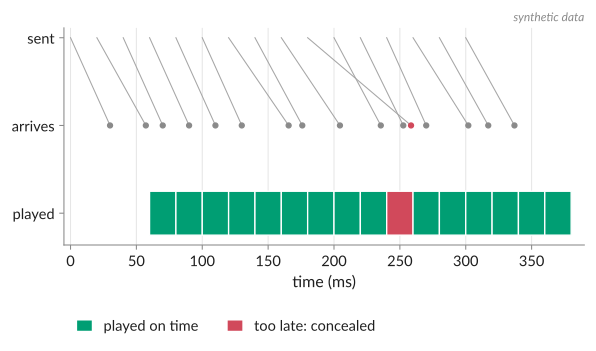
Packets do not arrive at even intervals. One takes 20 ms, the next 45 ms, the next 22 ms. That variation is jitter. A speaker, on the other hand, must be fed at exactly the playback rate. The jitter buffer sits between the two: it holds a few frames, and plays them out at a steady pace.
The trade-off is direct. A deeper buffer absorbs more jitter, so fewer packets arrive too late to play, but every millisecond of buffer is a millisecond of delay the user hears. In the guide's words, "a single delayed packet forces us to expand our jitter buffer, holding onto other received packets until the delayed packet arrives", and "a larger jitter buffer translates directly to a larger perceived delay" (§5.7).
WebRTC's jitter buffer is called NetEq: "the audio jitter buffer and packet loss concealer", and
it is "adaptive, meaning that the buffering delay is continuously optimized based on the network
conditions" (WebRTC modules/audio_coding/neteq/g3doc/index.md, branch-heads/8131, lines 6-11). Its
interface has two calls. InsertPacket stores an arriving packet and updates its statistics;
GetAudio "pulls 10 ms of audio from NetEq for playout", and each 10 ms it returns is either normal
audio, slightly sped-up or slowed-down audio (to drain or grow the buffer), concealment for a missing
packet, or comfort noise (same file, lines 15-68). Its target delay starts at 80 ms
(kStartDelayMs = 80, delay_manager.cc line 27) and is then chosen so that 95% of recent packets
would have arrived in time (quantile = 0.95, delay_manager.h lines 33-34).
So a fresh WebRTC call starts with about 80 ms of jitter buffer and adapts from there. The 40 ms per direction in the budget table of chapter 18 is the guide's figure for a running call, not a fixed number.
Echo cancellation runs on the device¶
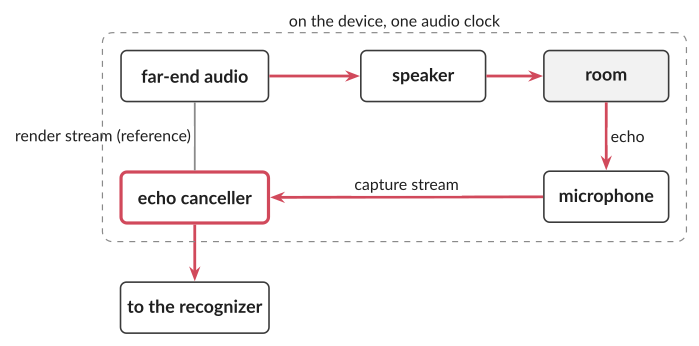
A voice agent talks through the user's speaker while listening through the user's microphone. Without help, the microphone hears the agent's own voice, the recognizer transcribes it, and the agent interrupts itself or answers itself. Acoustic echo cancellation (AEC) removes the speaker's sound from the microphone signal.
To do that, an echo canceller needs two things: the exact signal that was sent to the speaker, and
the delay between playing a sample and hearing it come back through the room. WebRTC's audio
processing module says so in its interface: it works on "the near-end (capture) and far-end (render)
streams", and "should be placed in the signal chain as close to the audio hardware abstraction layer
(HAL) as possible"; "on the server-side, the reverse stream will normally not be used"
(api/audio/audio_processing.h, lines 48-57). The delay it needs is
"(t_render - t_analyze) + (t_process - t_capture)", measured against the moments the audio hardware
renders and captures each frame (same file, lines 600-611).
A server has neither the render signal as played nor the hardware clocks. Only the device has them. That is why the guide says "echo cancellation has to run on the device (not in the cloud)" (§5.6.2). Browsers, telephone stacks and WebRTC mobile SDKs include it; an app that captures raw microphone audio and sends it over a WebSocket gets none unless you add it.
In a browser you ask for it when you open the microphone. getUserMedia takes an echoCancellation
constraint whose values are false, true, "all" or "remote-only". With "all", "the system MUST
attempt to remove all sound being played by the system from the input signal of the microphone"; with
"remote-only", only sound "from incoming audio MediaStreamTracks sourced from WebRTC
RTCPeerConnections" (Media Capture and Streams, CRD
2025-10-09, §4.3.8). The specification names WebRTC peer-connection audio as the case it guarantees.
Whether plain true also removes TTS audio that your page plays through the Web Audio API after
receiving it over a WebSocket depends on the browser. Test it in the browsers you support; do not
assume it. The tutorial above combines echoCancellation: true with "a simple echo gate that
attenuates mic input while the agent is speaking" on the server (arXiv:2603.05413, §6.2, p. 8), a
belt-and-braces approach that costs the user the ability to interrupt while the gate is closed.
WebRTC's current echo canceller, AEC3, takes 10 ms frames and runs its filters on 64-sample blocks,
250 per second (modules/audio_processing/aec3/echo_canceller3.h lines 84-90; aec3_common.h
lines 28, 35, 47).
Browser audio has its own buffers¶
If your client is a web page, two more buffers appear.
The Web Audio API processes audio in render quanta of 128 sample frames by default (a sample frame is one sample per
channel, not a codec frame) ("The
AudioContext's render quantum size is the default value of 128 frames", Web Audio API 1.1, W3C Working
Draft 2026-09-22, §1.1). That is 2.67 ms at 48 kHz. An AudioWorkletProcessor, the modern way to touch
raw samples in a page, is called once per quantum. One 20 ms Opus frame at 48 kHz is 960 samples, 7.5
quanta, so a capture worklet that sends whole frames must collect samples across quantum boundaries.
The specification's own example gives the base output latency at 44.1 kHz with double buffering:
(2 × 128) / 44,100 ≈ 5.8 ms (baseLatency, §1.2.2). On top of that comes outputLatency, the
operating system's and device's share, which the browser can only estimate. The old
ScriptProcessorNode allowed only buffers of 256 to 16,384 frames, 5.3 ms to 341 ms at 48 kHz, which is
one reason tutorials moved to AudioWorklet.
The device itself¶
Below the browser sit the operating system's audio stack and the hardware. Their delay varies far more than anything else in this chapter.
Android is one of the few platforms that states limits. Android 16's compatibility definition requires
a round-trip latency, from speaker back to microphone through a loopback, of at most 200 ms for handheld
devices that have audio output and a microphone (Android 16 lowered it from 250 ms); 80 ms for devices that declare Media Performance Class 13 or later; 50 ms for
FEATURE_AUDIO_LOW_LATENCY; and 25 ms for FEATURE_AUDIO_PRO (Android 16 CDD §5.6). Round-trip latency
there is "the Mean Continuous latency over 5 measurements, measured over a loopback path that feeds the
output back to the input" (same section).
Compare that with the 55 ms of microphone plus speaker delay in the macOS rows of the budget in chapter 18. A phone that only meets the baseline may add up to 200 ms on its own.
Bluetooth headsets add more. The guide says they "can add several hundred milliseconds of latency to voice input" (§5.6), and I found no primary measurement to put a number on it. The exercise below shows you how to measure your own devices.
Sample rates at the boundaries¶
A typical path converts sample rates three times:
- WebRTC's Opus runs at 48 kHz (RFC 7587 §4.1).
- The voice activity detector and the recognizer want 16 kHz. Silero VAD, for example, accepts only
8 or 16 kHz, in windows of 512 samples at 16 kHz (32 ms) (chapter 7; Pipecat's wrapper, v1.15.0,
src/pipecat/audio/vad/silero.pyline 109, enforces the same). - The TTS model produces 24 kHz (OpenAI's PCM output is "24kHz (16-bit signed, low-endian)", OpenAI TTS guide, fetched 2026-10-29), 22.05 kHz, or another rate, and Opus has no 22.05 kHz or 44.1 kHz mode, so the output is resampled to 48 kHz before encoding.
Each resampler is cheap in compute but adds a few milliseconds of filter delay, and a wrong assumption about the rate at any boundary is one of the most common bugs in a first voice pipeline: the audio plays at the wrong speed or pitch, or the recognizer silently returns nonsense.
Adding it up¶
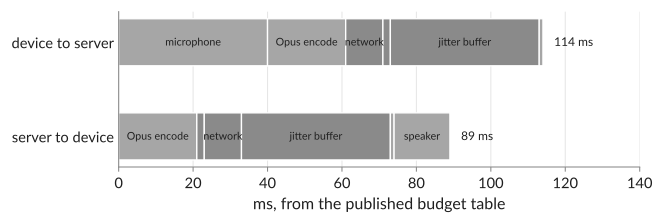
The guide's budget table (examined row by row in chapter 18) puts the device and network share of one voice-to-voice turn at: microphone 40, Opus encode 21, network 10, packet handling 2, jitter buffer 40 and decode 1 on the way in, 114 ms; and encode 21, packet handling 2, network 10, jitter buffer 40, decode 1 and speaker 15 on the way out, 89 ms. Together, 203 ms, before any model has done any work (guide, fetched 2026-10-29).
The 21 ms for "opus encoding" is close to the 20 ms frame itself; the guide does not say how it was obtained, so read it as frame time rather than encoder compute. The reference encoder, libopus, adds 6.5 ms of look-ahead to every frame (measured in Try it), so a 20 ms frame costs 26.5 ms from its first sample to the encoder's output. Replace the 55 ms of macOS microphone and speaker with a baseline Android phone's 200 ms round trip and the device-and-network share becomes about 348 ms.
Common misconceptions¶
"Lower bitrate means lower latency." Bitrate changes how many bits a frame takes, not how long the frame is. Latency comes from frame duration, codec look-ahead, the jitter buffer and the network. At WebRTC's usual 32 kbit/s a 20 ms frame is 80 bytes; sending it takes microseconds on any modern link.
"A WebSocket is fine because my connection is fast." Speed is not the problem; loss is. On a clean office network a WebSocket works well. On a mobile network with occasional loss, TCP retransmission holds every later packet until the lost one arrives, and the user hears a stall instead of a brief concealed glitch.
"I can cancel echo on the server." The server does not have the exact signal the user's speaker played or the device's audio clock. Echo cancellation needs both. Put it on the device, through the browser or the WebRTC SDK, and if you must do something on the server, prefer a gate you can open for barge-in over cancellation you cannot do correctly.
Try it¶
The scripts for this chapter are in code/serve/ch17/ (environment ssh-serve, see code/serve/README.md);
my numbers come from their result files in code/serve/results/. None needs a GPU. The networks in steps 2 and
4 are simulated, so they show trade-offs, not any real network.
CPU track¶
- Frames over a WebSocket.
ws_transport.pystreams a 16 kHz recording at real time in 20 ms frames to a receiver on the same machine, as raw PCM (640 bytes per frame, 256 kbit/s) or as Opus at 24 kbit/s (23.0 kbit/s of payload measured). On loopback the network share is about 1 ms (p50 1.07 ms for PCM, 0.84 ms for Opus). From the first sample of a frame to its decoded samples at the receiver took 21.9 ms (PCM) and 23.5 ms (Opus) at the median: almost all of it is waiting for the 20 ms frame to fill. Opus encoding took about 1.2 ms per frame and decoding about 0.2 ms. The Opus figure leaves out the codec's 6.5 ms look-ahead (step 3), so the whole Opus path is about 30 ms. - The same with a bad network. Add synthetic jitter (
--jitter wifiormobile). The same Opus stream took 33 ms at the median and 54 ms at p95 with the Wi-Fi profile, and 58 ms and 272 ms with the mobile profile. The median hides what a jitter buffer must absorb; the p95 shows it. - Opus delay.
opus_delay.pyencodes and decodes a recording with libopus 1.3.1 at every frame size and measures the delay between input and output by cross-correlation. It is the same 6.5 ms (104 samples at 16 kHz) for every frame size: libopus reports a look-ahead of 2.5 ms (st->Fs/400) plus a fixed delay compensation of 4 ms (st->delay_compensation = st->Fs/250) in every mode except restricted-low-delay (src/opus_encoder.c at v1.3.1, lines 256 and 2570-2580). The frame itself adds its own length on top, because the encoder cannot start before the frame is full, so a 20 ms frame costs 26.5 ms and a 60 ms frame 66.5 ms. That is 1.3 ms more than the 65.2 ms the RFC gives as the format's maximum: the RFC counts what the format requires, and the compensation is this encoder's choice. With synthetic random loss of a nominal 5% of packets (14 of 362 lost), Opus's in-band FEC recovered the waveform to an SNR of 21.9 dB against 15.4 dB for concealment alone (PLC), at the same 22.8 kbit/s; at 20% loss, 9.1 against 5.5 dB. SNR is a waveform measure, not what a listener hears. - A jitter buffer.
jitter.pyplays 20 ms packets through a toy jitter buffer on three synthetic networks and sweeps its depth. The depth needed to keep late packets under 1%, median of five seeds:
| Network (synthetic) | UDP-like delivery | TCP-like, 200 ms retransmit | TCP-like, fast repair |
|---|---|---|---|
| calm: 4 ms mean jitter, no loss | 14 ms | 14 ms | 14 ms |
| Wi-Fi-like: 10 ms jitter, 1% spikes, 1% loss | 48 ms | 204 ms | 122 ms |
| mobile-like: 25 ms jitter, 2% spikes, 3% loss | 269 ms | 293 ms | 288 ms |
"Fast repair" assumes a lost segment is resent after about one round trip; the 200 ms column uses Linux's
minimum retransmission timeout (TCP_RTO_MIN, HZ/5 = 200 ms, include/net/tcp.h line 145 at Linux v6.8). The
repair time is an assumption of the model, which is why both are shown.
UDP's lost packets (1% and 3%) are concealed at any depth and are not counted as late; the TCP-like transports
lose nothing, they only deliver late.
On a calm network the transport does not matter. With 1% loss, a transport that retransmits must hold every later packet until the lost one is repaired, and the buffer must cover the repair time: 204 ms instead of 48. This is the head-of-line blocking that gives a TCP-like transport a deeper buffer than UDP in this model when loss dominates, and none of it shows on a calm network. On the mobile-like network the 250 ms delay spikes set the depth for both transports, and the gap shrinks to about 20 to 25 ms.
GPU track¶
None for this chapter: transport runs on CPUs. Chapter 18 runs the full cascade on the GPU.
English and Mandarin¶
Transport does not depend on the language. Run steps 1 and 3 with one English and one Mandarin
recording from the book's test sets (--utt <id>, ids from code/serve/data/test_utts.jsonl) to confirm that nothing in the path assumes a language (it should
not).
Measure your own devices¶
Play a short click through your speaker and record it with your microphone, from a browser page or a small script, and measure the time between them. Repeat with wired headphones and a Bluetooth headset. That is your device's round-trip latency, measured the way Android's CDD defines it, and it belongs in your own latency budget.
Key terms¶
- codec frame: the stretch of audio a codec compresses as one unit; Opus uses 2.5 to 60 ms.
- packet: one or more frames plus network headers, sent as one unit.
- Opus: the standard real-time audio codec of the web (RFC 6716).
- in-band FEC: a low-bitrate copy of an important frame carried in a later packet.
- packet loss concealment (PLC): the decoder's substitute for a missing frame.
- head-of-line blocking: on TCP, every later byte waits for a lost one.
- jitter: variation in packet arrival time.
- jitter buffer: the buffer that turns irregular arrival into steady playout; its depth is delay.
- acoustic echo cancellation (AEC): removing the device's own speaker sound from its microphone signal.
- render quantum: the block of samples the Web Audio API processes at once, 128 frames by default.
- round-trip latency (device): speaker-to-microphone delay through a loopback.
Sources¶
- RFC 6716, Definition of the Opus Audio Codec (2012): https://www.rfc-editor.org/rfc/rfc6716
- RFC 7587, RTP Payload Format for the Opus Speech and Audio Codec (2015): https://www.rfc-editor.org/rfc/rfc7587
- WebRTC source, branch-heads/8131 (commit c40a92ab): NetEq (
modules/audio_coding/neteq/), audio processing (api/audio/audio_processing.h), AEC3 (modules/audio_processing/aec3/): https://webrtc.googlesource.com/src/+/c40a92ab4301e11e559ec5b05c9eafd708878eab/ - Web Audio API 1.1, W3C Working Draft 22 September 2026: https://www.w3.org/TR/2026/WD-webaudio-1.1-20260922/
- Media Capture and Streams, W3C Candidate Recommendation Draft 9 October 2025: https://www.w3.org/TR/2025/CRD-mediacapture-streams-20251009/
- Android 16 Compatibility Definition, §5.6 Audio latency: https://source.android.com/docs/compatibility/16/android-16-cdd
- Daily / Pipecat, Voice AI & Voice Agents guide (updated June 2026, fetched 2026-10-29): https://voiceaiandvoiceagents.com/
- Building Enterprise Realtime Voice Agents from Scratch: A Technical Tutorial, arXiv:2603.05413: https://arxiv.org/abs/2603.05413
- Pipecat v1.15.0,
src/pipecat/audio/vad/silero.py: https://github.com/pipecat-ai/pipecat/blob/v1.15.0/src/pipecat/audio/vad/silero.py#L109 - OpenAI text-to-speech guide (fetched 2026-10-29): https://developers.openai.com/api/docs/guides/text-to-speech